
The household book for young and old
Know what you can afford – before the money is gone.
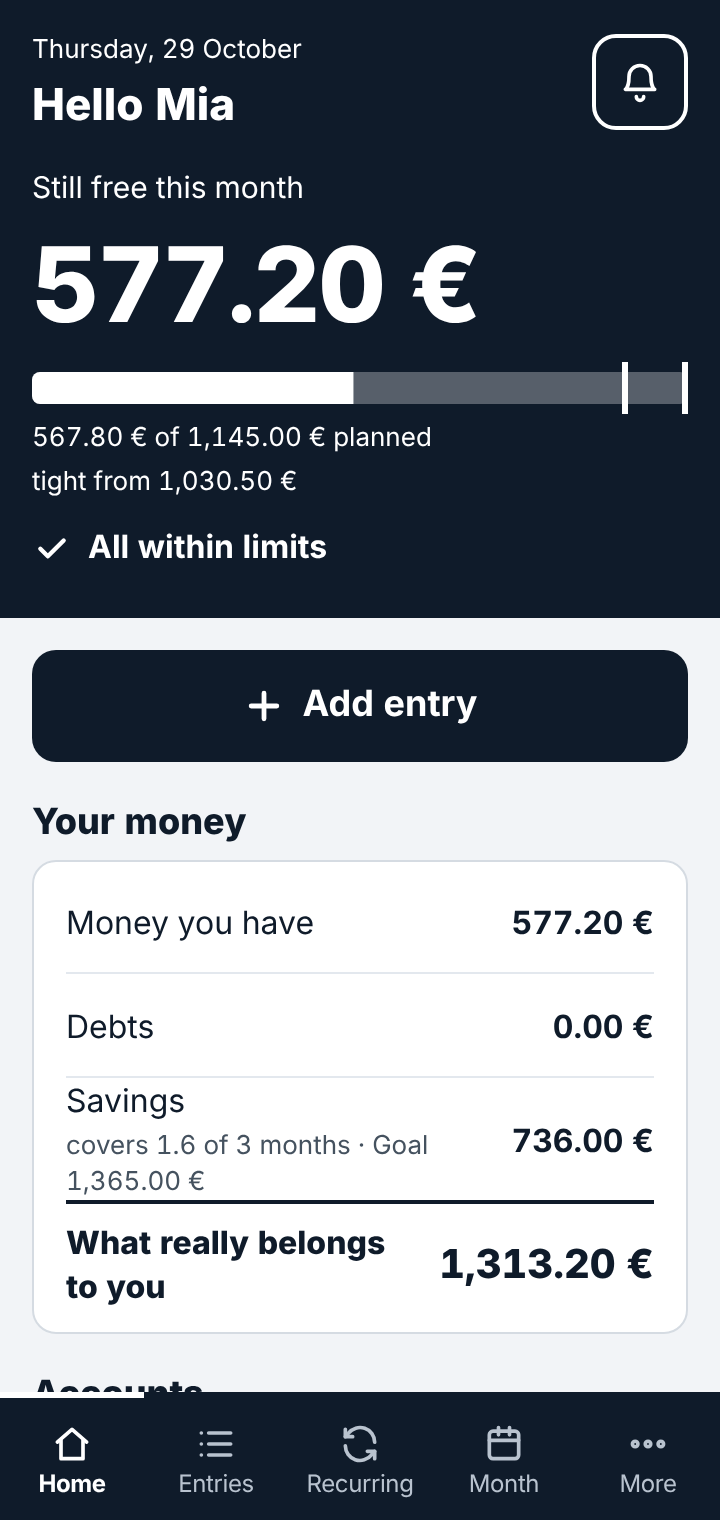
Bank account, PayPal, Wise, credit cards, subscriptions – with many accounts it is easy to lose track. In KO-HM you deliberately enter everything yourself, in one book. It shows what is already committed and what is still free this month – and puts on the brakes before new contracts exceed your income.
Runs on your own web hosting · German, English, Thai · no ads, no tracking
Why it exists
Today money sits in many places: in the bank account, at PayPal or Wise, on one or more credit cards. No single balance tells you how much there is in total – and how much of it is already committed. Rent, phone contract, subscriptions and instalments run quietly in the background – and at the end of the month money is missing, although you "didn't really buy anything". The KO-HM Household Manager makes these connections visible before money gets tight.
Regular bills in view
The app enters recurring income and bills on their due date by itself. Rare costs such as a yearly insurance are put aside month by month.
Warned in time
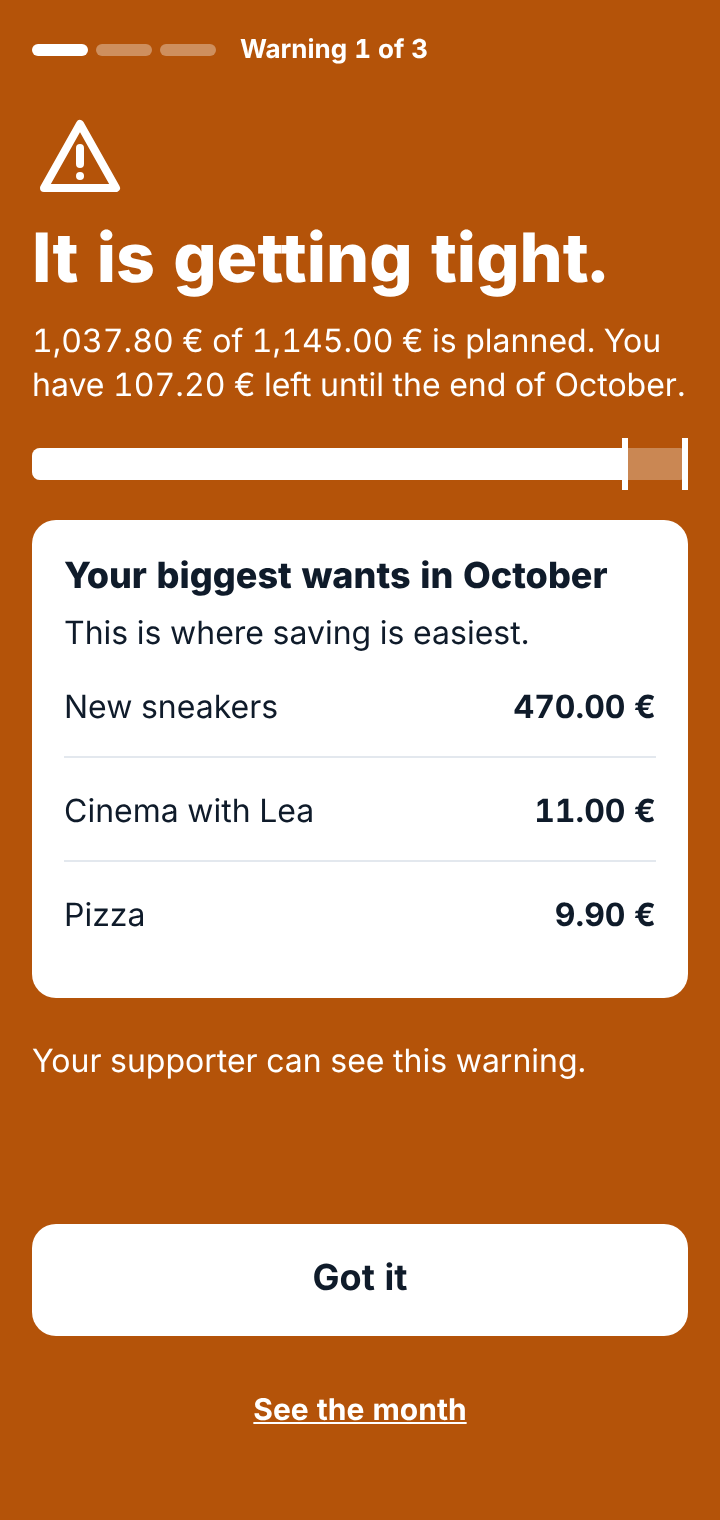
At 90 % of the available money the app says "It is getting tight", at 100 % "Your money is all planned". If the money is not enough, no new contracts can be started.
Learning, not punishing
Plain language, no jargon. The app explains every calculation in full sentences – so numbers turn into understanding.
Deliberately by hand – that is the trick
The Household Manager does not keep itself. It is not connected to any bank or banking app. If you pay by credit card, PayPal or cash today, you enter the expense right afterwards – it takes seconds. This deliberate entering and keeping is exactly what gives you the overview no automatic bank statement can. And no login details ever leave your home.
Who it is for
For everyone who wants to learn how to handle money, or get it back under control – with or without support.
Keeps the book
Pupils, apprentices, students
The first own money, the first job, the first shared flat: plan calmly before the first instalment deal tempts you.
Keeps the book
Adults of every age
At work, in the family or in retirement: all accounts and cards in one book and a clear view of "what do I really have left". Entirely on your own.
If wanted
Parents alongside
Optional, for example for teenagers: parents see warnings, new debts and withdrawals from savings and write short notes – without changing any entries themselves.
Provides
Schools, social services, hosting providers
One installation per person, on your own web hosting – the data stays where you are responsible for it.
What it does
Built for the phone, just as complete on the computer. All pictures come from the real app.
01 · Entering
Every expense in seconds – with an eye on the rest of the month
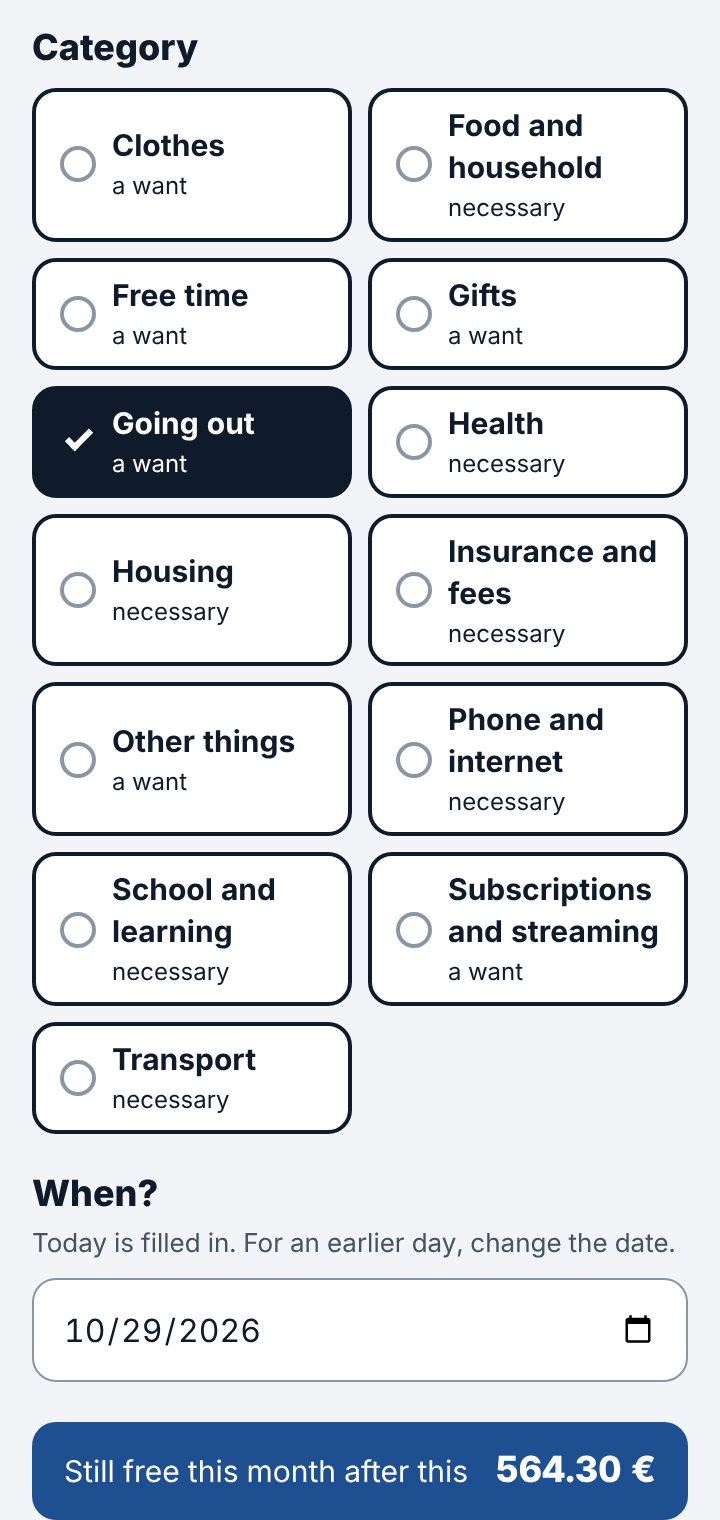
Enter it right after paying, whether cash, card or PayPal: amount, what for, account, category. Even before saving, the app shows what is still free this month afterwards. Names you used before are suggested; every category is "necessary" or "a want".
02 · Can I afford this?
An honest check before every new contract
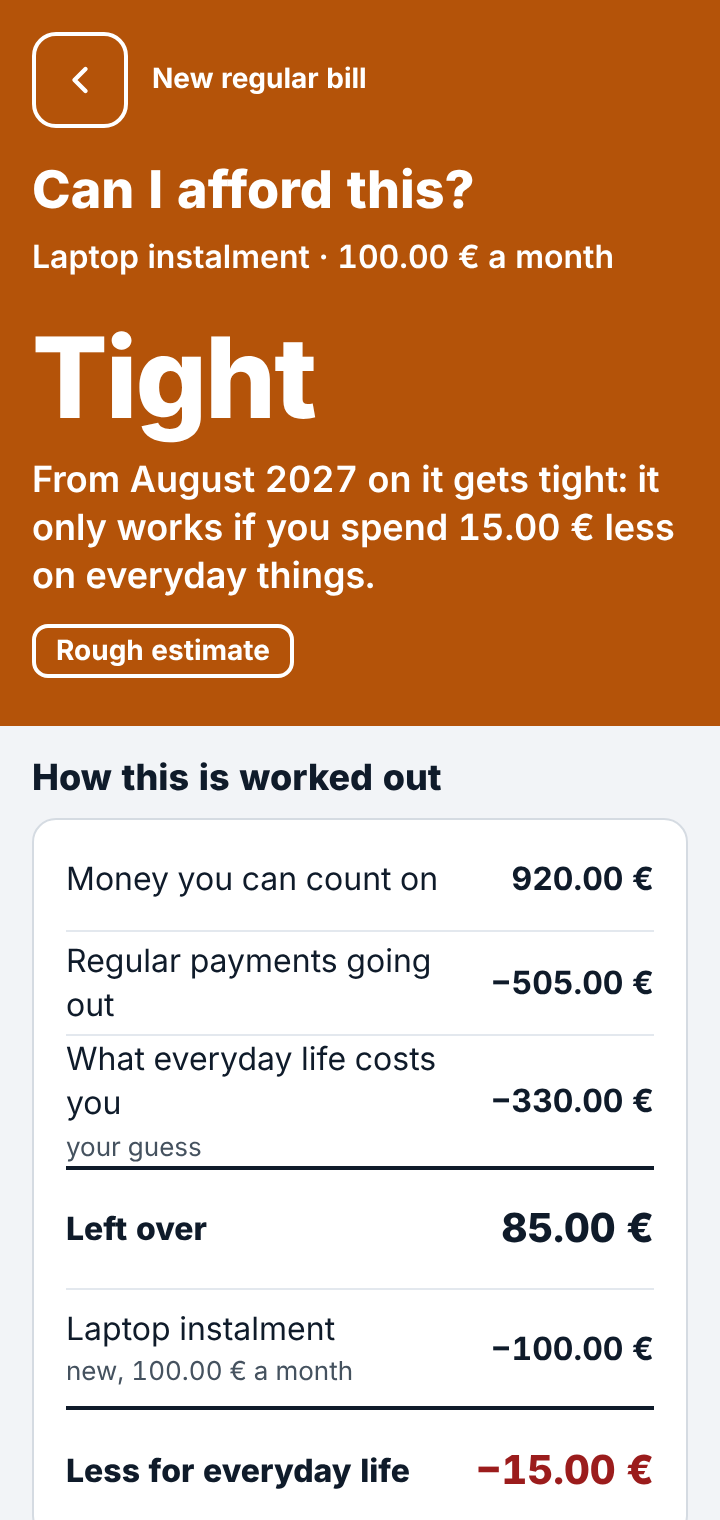
Phone contract, gym, a laptop in instalments: before regular bills start, the app calculates with safe money – income minus regular bills minus everyday spending – over the next twelve months. The result is "Fine", "Tight" or "Not possible", with the calculation in plain words.
If a job ends in three months, that stops a two-year loan. Savings are deliberately left out.
03 · Three warnings and a lock
Brakes before the money runs out
Every warning fills the whole screen and shows the biggest wants of the month – that is where saving is easiest. When the money is no longer enough, a lock begins: no new regular bills until the numbers add up again. Expenses can still be entered, so the book stays right.
04 · Overviews
Day, month, year and the next twelve months
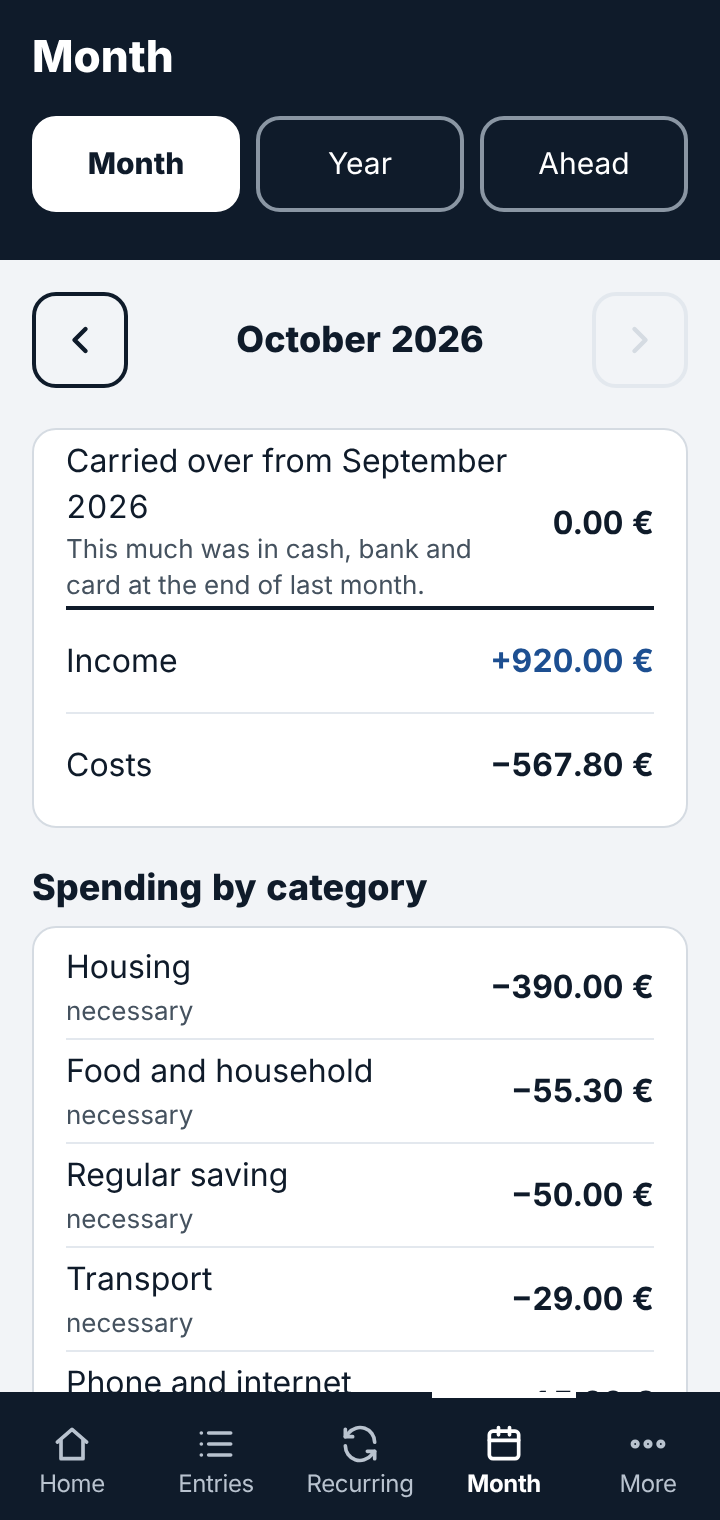
The month shows the carry-over, income and costs, totals per category and "necessary versus want". The preview shows when things get tight – for example when a job ends or a yearly bill is due.
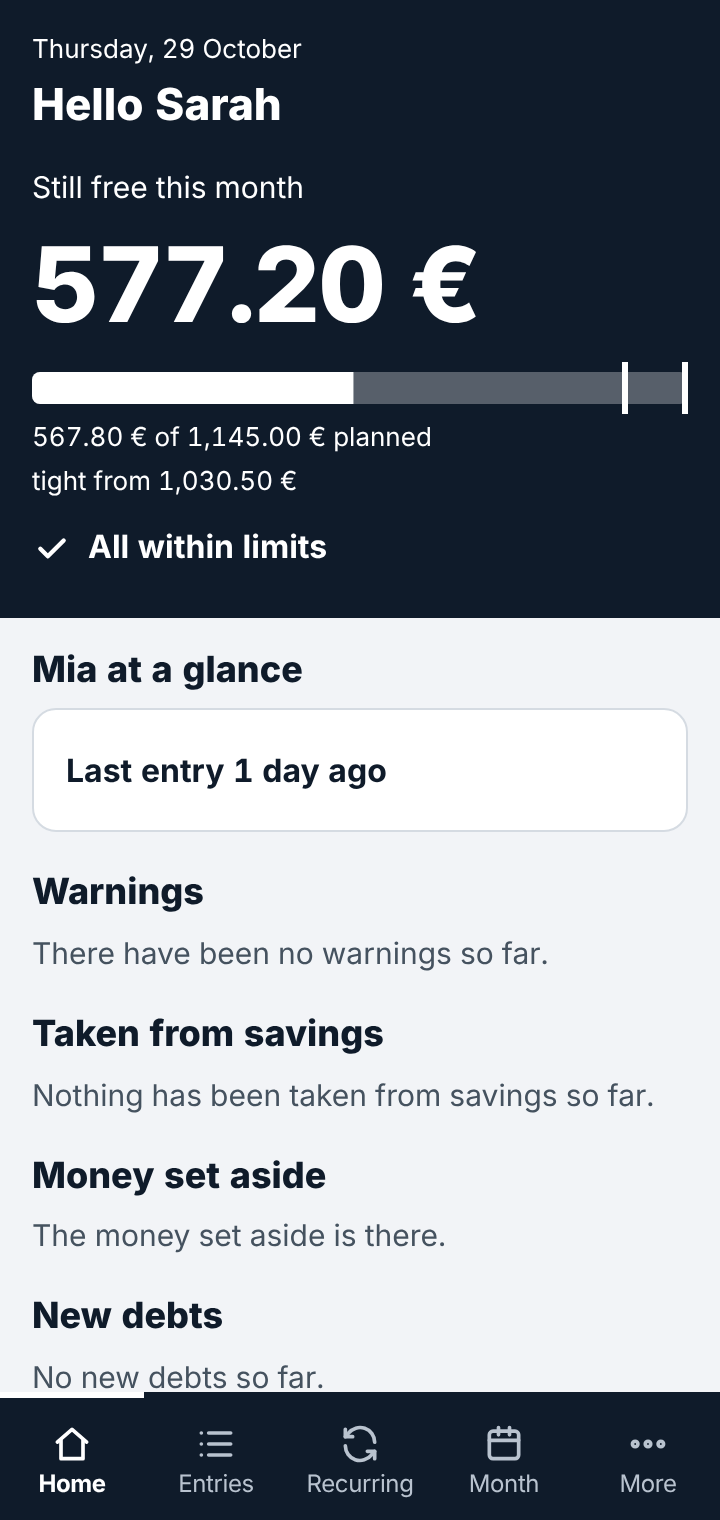
Savings with a safety goal, credit card with limit, debts with remaining term: "what really belongs to you" is always on the home screen.
05 · Optional: a companion
Support without taking over
Only if wanted, for example parents with teenagers: the companion sees on a home screen of their own what they should know – last entry, warnings with time, withdrawals from savings, new debts. They write short notes that get one reply. They cannot change entries – and the app tells the user openly that someone is reading along.
Without a companion you simply keep your book on your own – nobody reads along.
Important to know
KO-HM is a tool for keeping an overview – not financial, tax or legal advice. The app calculates only with the entries you make yourself. If income or expenses are missing or wrong, the overviews, the "Can I afford this?" check and the warnings will be wrong too.
Warnings and locks are guidance. Whether you follow them is your decision. The app does not prevent losses caused by ignored warnings or by missing or incorrect entries. To the extent permitted by law, our liability is limited to the licence fee actually paid.
Your data stays with you
Runs on your own web hosting. No connection to banks, no login details. We run no server for your data, and nothing is loaded from other servers.
Encrypted backup
One tap saves the whole book as an encrypted file – on the phone straight to Google Drive, OneDrive or any other storage.
Nothing disappears
Entries are corrected or cancelled, never deleted. Every earlier state stays visible in the history.
Three languages, five colours
German, English and Thai from the start. Every user picks their own colour theme.
What you need to use it
No app store, no database to set up, no command line: upload the folder, open the address, and the assistant does the rest in a few minutes.
Try it, then unlock it
Every new installation runs for 30 days as a full trial. After that it needs an unlock code – otherwise the book can only be viewed.
No installation
Online demo
Request a personal trial access and try the app as user and as companion – with sample data in your language.
Go to the demoYour own installation
Licence: price on request
One unlock code per installation, tied to its address and ID. When moving to a new address you get a new code free of charge.
Request a licence